Claude Cowork and ChatGPT have moved well beyond chat. Both can research, work across files and connected tools, and produce finished documents for review. The better choice depends less on which chatbot writes nicer paragraphs and more on where your work lives.
Quick take: Claude Cowork is especially strong for handing off knowledge work across selected folders, files and connected tools. ChatGPT offers a broader set of modes for chat, research, agentic work, images and coding. Both require clear permissions and human review for consequential actions.
Features and prices were checked against official product pages on August 22, 2026.
What is Claude Cowork?
Claude Cowork is Anthropic’s agentic workspace for non-coding work. You give it a goal and access to specific folders or tools. It can then research, analyze information, create files, use connectors and complete multi-step tasks for review.
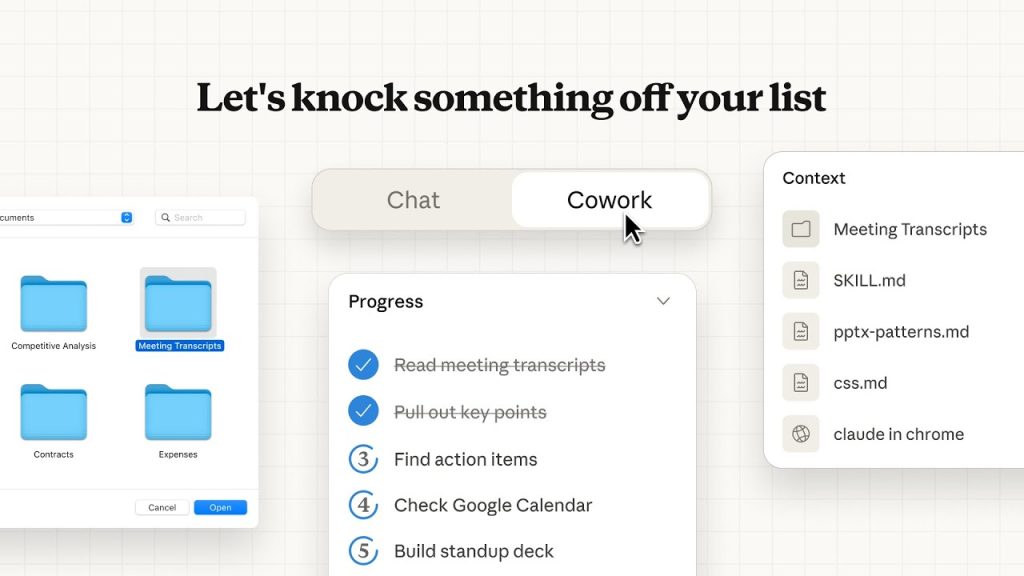
Cowork is available through paid Claude plans. Anthropic currently offers desktop downloads for macOS, Windows, ChromeOS and Linux, while web and mobile access are in beta. Desktop access matters when Claude needs permission to work with local folders or applications.
Cowork can also continue cloud tasks while your laptop is closed, schedule recurring work and split larger jobs across sub-agents. Connectors are preferred when available; browser or screen interaction acts as a fallback for tools without a structured integration.
What is ChatGPT for work?
ChatGPT now separates several kinds of work:
- Chat for questions, drafts, analysis and everyday assistance
- Work for longer tasks that use sources, tools and multiple steps to produce finished deliverables
- Codex for software development and technical workflows
- Deep research and agent mode for sourced investigation and web-based actions where available
- ChatGPT Images for creating and editing images
ChatGPT Work can use connected apps and files, create documents and continue cloud tasks across desktop, web and mobile on eligible plans. In the desktop app, it can also work with local files and applications when permitted.

Claude Cowork vs ChatGPT: quick comparison
| Area | Claude Cowork | ChatGPT |
|---|---|---|
| Best fit | Knowledge work across selected files, folders and connected tools | Broad mix of chat, research, work, coding and image tasks |
| Local files | Desktop app can work directly in folders you approve | Desktop Work and Codex can use permitted local files and apps |
| Cloud work | Can continue tasks and schedules while your device is closed | Cloud Work can continue across desktop, web and mobile |
| Connected tools | Connectors, remote MCP and plugins | Plugins and connected sources such as Drive, Slack and Microsoft 365, depending on plan |
| Browser interaction | Uses connectors first, then browser or screen interaction when needed | Work and agentic modes can research and act on the web within their permissions |
| File creation | Documents, spreadsheets, presentations and other supported files | Documents, spreadsheets, presentations, reports and other supported files |
| Coding | Claude Code is the dedicated coding product | Codex is the dedicated coding product |
| Images | Can analyze images and use relevant tools | Integrated image generation and editing |
| Human control | Folder and tool permissions, visible progress and approval controls | Workspace permissions, visible progress and approvals for important actions |
The products are changing quickly. Treat feature lists as a snapshot and verify any workflow-critical capability on the official pages before rollout.
Which tool is better for common workflows?
Campaign briefs and document-heavy projects
Best starting point: Claude Cowork. It is well suited to reviewing a folder of notes, research and brand material, then producing a structured brief or presentation. ChatGPT Work can handle the same class of task, so the deciding factor is usually which connectors and workspace your team already uses.
Current web research
Best starting point: ChatGPT. Deep research and Work provide a natural path from current-source research to a finished memo or presentation. Claude also supports web research, so compare citation quality on your actual topic rather than relying on a general winner.
Recurring reports
Either can work. Both products can collect information from approved sources and produce scheduled reports. Test source reliability, failure handling and usage cost before moving a recurring process into production.
Local file organization
Best starting point: Claude Cowork. Its folder-oriented workflow is direct: choose the folder, define the result and review the proposed changes. Use a test folder before granting access to important files.
Software development
Use the dedicated coding surface. Claude Code and Codex are designed for repositories, terminals and development workflows. Cowork and ChatGPT Work are better suited to the surrounding research, planning and documentation.
Content production
Either can work. The model matters less than the source material, examples and review process. Use our prompting guide to define the audience, source material, output and boundaries instead of asking for generic content.
Pricing
As of August 22, 2026:
- Claude Cowork is included with Claude Pro at $20 per month, or $17 per month when billed annually. Claude Max starts at $100 per month.
- Claude Team standard seats cost $25 per month or $20 per month when billed annually.
- ChatGPT Plus starts at $20 per month. ChatGPT Pro has higher-usage options, while ChatGPT Business costs $25 per user monthly or $20 per user monthly when billed annually.
Agentic work can consume separate usage allowances or credits. Check Claude pricing and ChatGPT pricing before purchasing.
Privacy, security and control

Do not choose based on a single privacy slogan. Review the plan and deployment you will actually use.
- Scope access: connect only the folders, apps and accounts required for the workflow.
- Start with drafts: keep sending, publishing, deletion, purchases and production changes behind approval.
- Separate sensitive data: use dedicated accounts or test environments when possible.
- Check administrative controls: SSO, role-based access, retention, audit coverage and connector controls vary by plan.
- Verify the result: citations, totals and file changes still need human review.
For regulated or confidential work, involve the person responsible for security and compliance before connecting production data.
Decision guide
Choose Claude Cowork first if:
- Your work starts in folders, documents and spreadsheets
- You want a direct handoff model for research and document production
- Your organization already uses Claude, Claude Code or Anthropic connectors
Choose ChatGPT first if:
- You want one product covering chat, web research, Work, coding and images
- Your team already uses ChatGPT projects, plugins or business workspaces
- Current-source research and mixed-media creation are frequent tasks
Use a two-week test with three real workflows. Measure output quality, completion time, corrections, failed tool actions and total usage cost. The winner is the one that completes your work reliably, not the one with the longer feature page.
FAQ
Does Claude Cowork work on Windows?
Yes. Anthropic provides desktop downloads for Windows as well as macOS, ChromeOS and Linux.
Can Claude Cowork work from a phone?
Yes. Web and mobile access are in beta, and cloud tasks can continue while your laptop is closed.
What is the closest ChatGPT equivalent to Claude Cowork?
ChatGPT Work is the closest general comparison. Codex is the dedicated coding surface, while Deep research and agent mode cover other parts of the workflow.
Which is better for writing?
Both can produce strong writing when given useful source material, examples and constraints. Test the documents your team actually creates rather than relying on a generic style comparison.
Verdict
Claude Cowork is a strong choice for handing off document-heavy knowledge work across approved files and tools. ChatGPT is broader, with distinct modes for chat, Work, research, coding and images.
Choose based on integration fit, control and reliability. A polished demo is nice. A workflow that still works on Monday morning is better.